追記> 全てのプロファイルをリセットする、で解決したことがありました。有効な対策かもしれません。
Try iterating over the 5 (I think?) profiles and reset each one. Then select the profile you want to use and pair back. Don't forget to also tell the machine to forget the keyboard, otherwise, it still won't work.
"<err> zmk: Security failed:" while pairing with MacOS · Issue #763 · zmkfirmware/zmk · GitHub
XIAO BLEとZMKでワイヤレス分割キーボードを色々試していると、しばしばキーボードの左右のペアリング(PCとキーボードのペアリングではなくて)がうまくできないということが起こります。 そういう時は公式にはsettings_reset.uf2を作って、書き込むことでペアリング情報を削除できるとあります。
Troubleshooting | ZMK Firmware
しかし、この通りやってもペアリングできないという事態が起こることがあります。 USBでロギングすると、こんなメッセージが出ています。 エラーメッセージが出ないこともありました。
[00:00:35.941,955] <err> zmk: Security failed: CB:4D:CB:F1:7B:FA (random) level 1 err 2
以下は、このような状況への対処策です。 ブートローダーを書き直してまっさらにしてしまうとうまくペアリングできました。 Adafruit_nRF52_Bootloaderをダウンロードしてきて、openocdで書き込むという手順になります。 ラズパイが必要です。
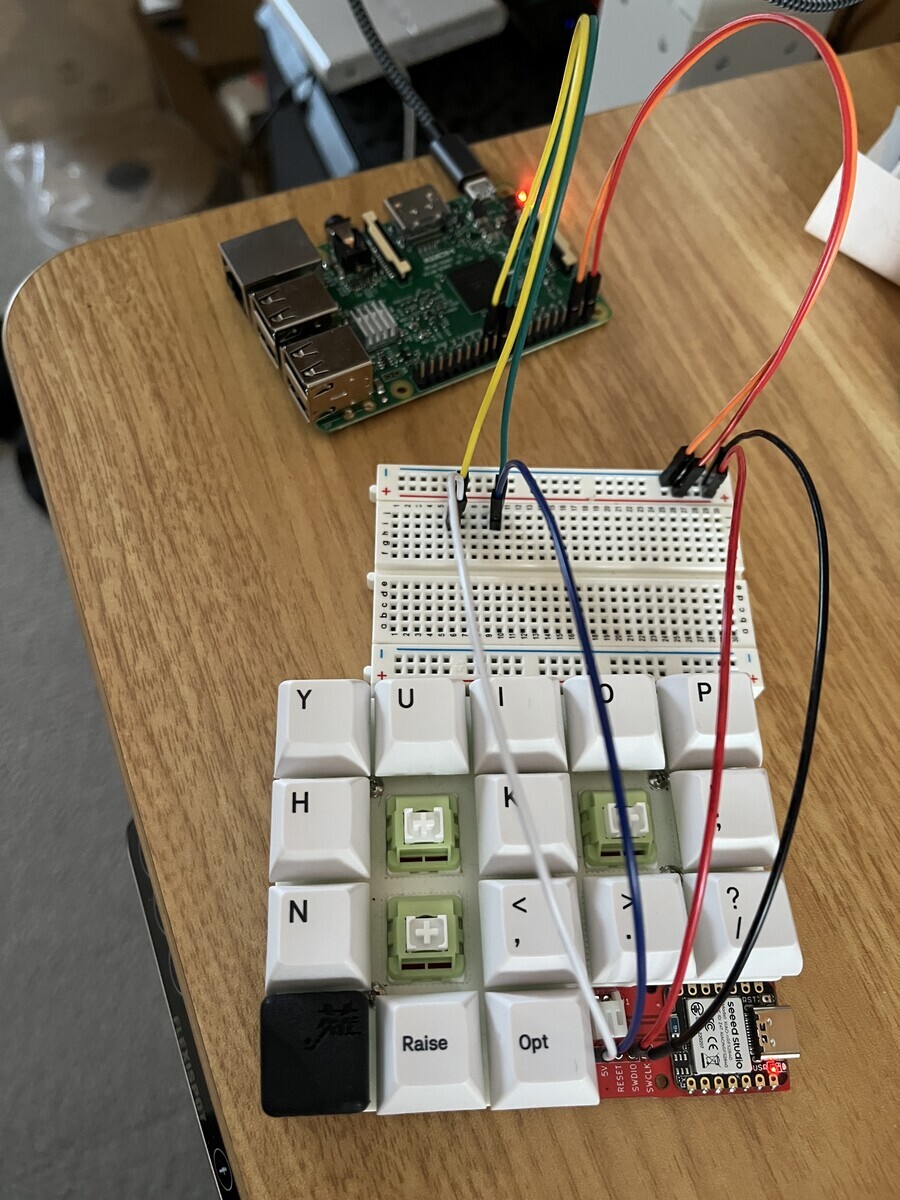
ラズパイとXIAO BLEの接続
| XIAO BLE | Rasberry Pi |
|---|---|
| 5V | 2 |
| GND | 6 |
| DIO | 22 (gpio 25) |
| CLK | 23 (gpio 11) |
ラズパイでの作業
sudo apt install openocd

wget https://github.com/adafruit/Adafruit_nRF52_Bootloader/releases/download/0.9.0/xiao_nrf52840_ble_bootloader-0.9.0_s140_7.3.0.hex

sudo openocd -f interface/raspberrypi-native.cfg -c "transport select swd" -f target/nrf52.cfg -c init -c "reset init" -c halt -c "nrf5 mass_erase" -c "program xiao_nrf52840_ble_bootloader-0.9.0_s140_7.3.0.hex  verify" -c reset -c exit
シルクが間違っているので、一見でたらめにつながっています。
参考文献
GitHub - adafruit/Adafruit_nRF52_Bootloader: USB-enabled bootloaders for the nRF52 BLE SoC chips
XIAO BLE (Sense) bootloader bricked, how to restore it? - #3 by Citric - XIAO - Seeed Studio Forum
Unbricking Seeed Studio Xiao BLE / Arduino Nano 33 BLE | Experimenty
